
Welcome back to Part 2 of our research into OAuth 2.0 misconfigurations. In Part 1, we explored the fundamental mechanics of OAuth and demonstrated how missing or unvalidated state parameters can lead to 1-click account takeovers in popular open source projects. However, simply having a state parameter isn't a silver bullet.
In this continuation, we will explore vulnerabilities that arise even when state checks are present. We will take a look at vulnerable flows, ranging from predictable state tokens and attacker session injection to the unique risks in custom CLI OAuth flows. Let's pick up right where we left off.
Common "state" problems
Predictable state tokens
Just because a state exists and has some checks doesn't mean CSRF is impossible. The RFC requires that the state must also be randomly generated. Without randomness in the state, an attacker can predict the valid value or reuse a valid state created by the vulnerable application.
The binding value used for CSRF protection MUST contain a non-guessable value.
https://www.rfc-editor.org/rfc/rfc6749#section-10.12
For example, Fastapi-users has a CSRF vulnerability in versions up to 15.0.2 (CVE-2025-68481). The OAuth login state tokens carry no non-guessable value. generate_state_token() is always called with an empty state_data dict, so the resulting JWT contains only a fixed audience claim and an expiration timestamp. The audience claim is hardcoded for every instance.
fastapi_users/router/oauth.py:14-71
On callback, the library merely checks that the JWT verifies under state_secret and is unexpired; there is no attempt to match the state value to the browser that initiated the OAuth request, no correlation cookie, and no server-side cache.
fastapi_users/router/oauth.py:130-141
Any attacker can hit /authorize, capture the server-generated state, finish the upstream OAuth flow with their own provider account, and then trick a victim into loading .../callback?code=<attacker_code>&state=<attacker_state>. Because the state JWT is valid for ~1 hour for any client, the victim’s browser will complete the flow. This leads to login CSRF. Depending on the app’s logic, the login CSRF can lead to an account takeover of the victim account or to the victim user getting logged in to the attacker's account.
Fastapi_users fixed the vulnerability by adding a random claim to the state JWT. Once the OAuth flow starts, the random claim is also saved as a cookie in the session that started the flow. On callback, the app checks whether a CSRF cookie exists in the session and whether the random CSRF claim in the state token matches it.
Attacker session injection
What happens if the victim user gets logged in to the attacker's account? At first sight, this might not seem like a big problem, right? Well, if attacker session injection can be chained with a self-XSS, even more damage can be inflicted by guiding the victim through high-value setup flows invisibly, performing potentially malicious actions within the vulnerable app, or performing cookie tossing. Feel free to check out the article to gain a deeper insight into what cookie tossing is and the mechanics behind the vulnerability. In the next case study, we will show how self-XSS and cookie tossing can be leveraged to achieve high impact from such a vulnerability.
A collaborative AI workspace aimed at non-technical users was affected by two issues: a session injection flaw in its OAuth login flow and a stored XSS vulnerability, discovered by our colleague Catalin Iovita, in his Exploiting Diagram Renderers research. Check out his great article to learn more about stored XSS using Mermaid diagrams.
The OAuth login state tokens don’t enforce the existence of any random stub or any data that could link them to the session that initiated the OAuth flow.
When a user makes a request to /auth/start/<provider>, they are redirected to a URL crafted using a helper method. This method generates the state. The state is a JSON object containing the redirect URL to which the user should be redirected if authentication succeeds, and the user’s UID, if one was provided when first requesting the /auth/start/<provider> endpoint.
When the callback request is made to /auth/callback/<provider>, a callback handler method is called. This function parses the state. If no uid value is present in the state JSON, it sets a cookie for the newly authenticated user, then redirects them to the redirect value returned by the parser method.
Any attacker can perform a request to /auth/start/<provider>, finish the upstream OAuth flow with their own provider account, and then trick a victim into loading .../auth/callback/<provider>?code=<attacker_code>&state=%7b%22redirect%22%3a%22http…. Because the state is not linked to the session that initiated the flow, this leads to login CSRF. Also, because the redirect URL is retrieved from the state, the user will be redirected to an attacker-controlled page in the webapp instance after the OAuth flow completes. You will see in a bit why this is important for us.
If the login CSRF attack is successful, the victim will be logged into the attacker’s account. We can leverage the stored XSS and the fact that the app doesn’t use __Host- prefixed cookies to perform cookie tossing and force requests to critical endpoints to use an attacker-controlled cookie, corresponding to their own session. This means that any time the victim tries to add AI provider API Keys (via /api/ai-provider/new) or MCP connection details (via /api/mcp-server/new), they will, in fact, be added to the attacker's account, not their own.
To exploit this, first, an attacker creates a canvas that has the following content inside:
This will render a clickable button on the screen.
Then, as with every OAuth Login CSRF, an attacker using their own account starts an OAuth flow and intercepts the callback request to the /auth/callback/<provider>?code=<code>&state=<state>... endpoint.
Then, the attacker tricks a logged-in user into visiting/auth/callback/<provider>?code=<code>&state=<state>... GET request (via phishing or a drive-by attack). Here, the attacker can set the state redirect value to the URL of their malicious canvas, so the victim is automatically redirected to it.
Because the app doesn’t check whether the state token is linked to the session performing the callback, the callback is processed, the grant code is sent to the provider, and the session injection takes place. Now, the victim user’s browser is authenticated as the attacker and sees the malicious canvas.
When the user clicks the button, two new _access_cookie cookies get written to the website’s cookie jar. However, these cookies have the path attribute set to /api/ai-provider/new and/api/mcp-server/new, respectively. After the cookies are written, the victim is logged out.
When the victim logs in again, a new _access_cookie cookie will be set for the / path. Now, their cookie jar has 3 _access_cookie cookies for different paths. This means that for any request except those to the aforementioned endpoints, the browser will use the victim’s access token, and for the critical endpoints, it will use the attacker's access token.
The victim user has a normal user experience while their secrets get exfiltrated to the attacker’s account.
Interchangeable state tokens
Finally, in addition to validating the state and including a random stub in it, a third condition must be met to make state tokens 100% safe. The state must be tied to the user session that initiated the flow.
The session can be tied to a user's session in multiple ways, but one easy-to-implement approach is to write the state token as a cookie in the session that initiates the OAuth flow. If the token also has a non-predictable part and is properly validated, there is no way to successfully perform login CSRF, because the attacker cannot be able to guess the value of the state cookie in the victim’s cookie jar to use it as a parameter.
An interesting example is CVE-2025-68158, affecting Authlib versions up to 1.6.6. These versions' cache-backed state is not tied to the initiating user session, so CSRF is possible for any attacker with a valid state (easily obtained via an attacker-initiated authentication flow). When a cache is supplied to the OAuth client registry, FrameworkIntegration.set_state_data writes the entire state blob under _state_{app}_{state}, and get_state_data ignores the caller’s session altogether.
authlib/integrations/base_client/framework_integration.py:12-41
Retrieval in authorize_access_token therefore succeeds for whichever browser presents that opaque value, and the token exchange proceeds with the attacker’s authorization code.
authlib/integrations/flask_client/apps.py:57-76
This opens the door to Login CSRF for apps that use cache-backed storage. Depending on the dependent app’s implementation (whether it somehow links accounts in the case of a login CSRF), this could lead to account takeover. To exploit such an app, the flow is similar to those outlined above: an attacker starts an OAuth flow, stops it before the callback request is made, and then tricks a user to make the callback request using the attacker's values for the state and code parameters.
To fix this issue, Authlib now saves the state data in the user’s session, even when using cache. This ensures that the state value is tied to the session that initiated the flow, blocking CSRF completely.
authlib/integrations/flask_client/apps.py:31-51
Custom OAuth flows
As SSO became more popular, vendors wanted to use OAuth in even more environments. This is what led to the creation of custom OAuth flows, such as Google's OAuth 2.0 for TV and Limited-Input Device Applications, which allow users to log in using OAuth on TVs or other limited-input devices. Another application for custom flows is SSO in CLI applications.
[redacted] is a proxy Server (AI Gateway) to call 100+ LLM APIs in OpenAI (or native) format, with cost tracking, guardrails, load-balancing, and logging. It also provides a CLI utility that allows users to log in to the server using OAuth.
Custom OAuth flows that require both browser and another medium (e.g., a terminal or TV) are interesting because they are easily exposed to CSRF. The following diagram shows the way [redacted] implements its CLI OAuth login.
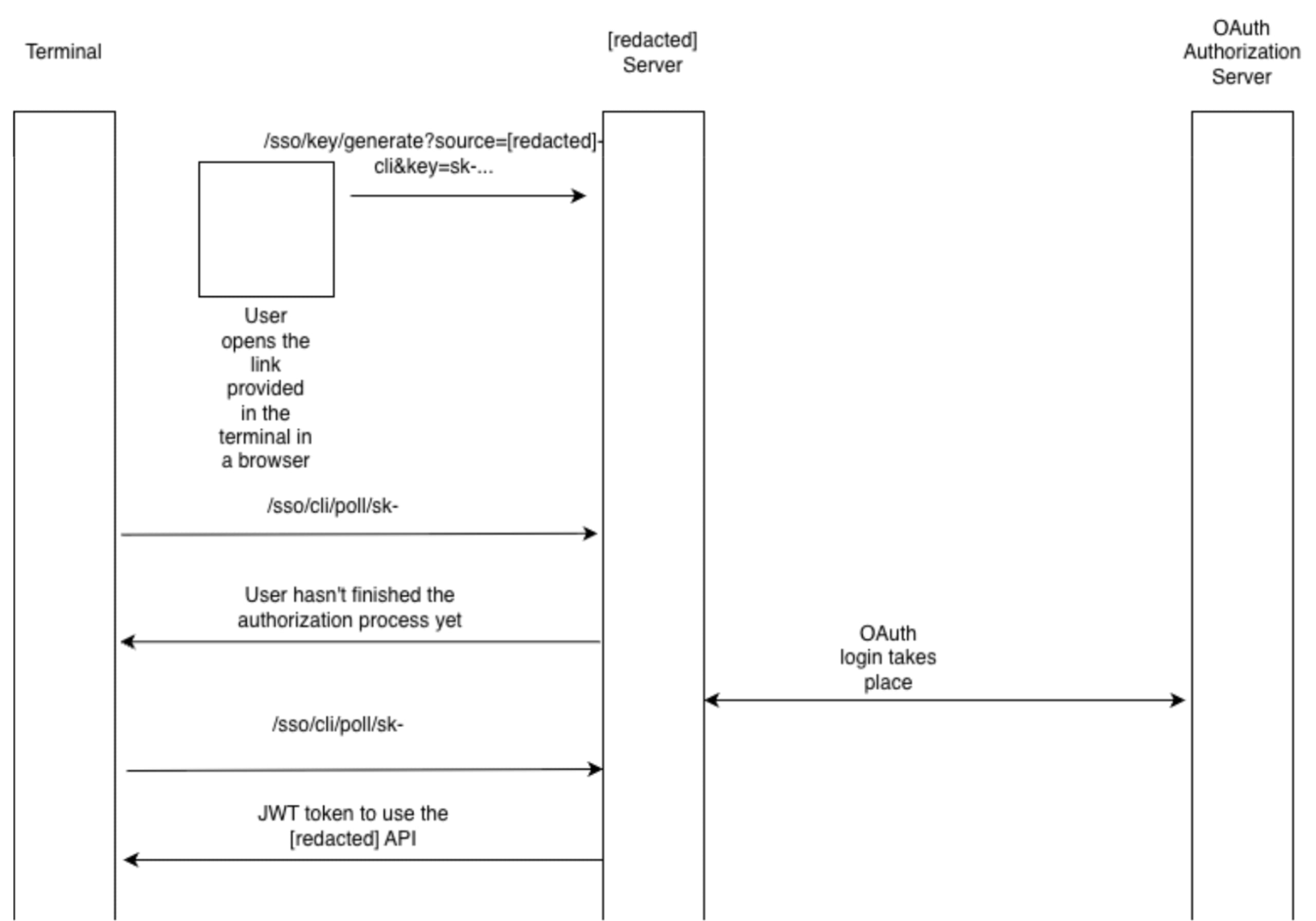
First, the terminal app outputs a link that the user needs to open in a browser to start the authentication process. The link makes a request to the /sso/key/generate endpoint with the following parameters: ?source=[redacted]-cli&key=sk-.... After this request, the server starts an OAuth flow in which the state parameter is not random; it's just [redacted]-session-token:<key>. That key comes straight from the /sso/key/generate query parameters, and _get_cli_state doesn’t add any entropy or track it server-side.
When a provider calls back to /sso/callback, the handler never verifies that the state matches one it issued. The only thing it does with the field is check whether it starts with [redacted]-session-token:; if it does, the request is routed to cli_sso_callback regardless of who initiated the flow.
cli_sso_callback then stores the fully authenticated session (user ID, role, teams, etc.) under a cache key derived from the attacker-supplied key.
The CLI app will start making requests to the /sso/cli/poll/sk-... endpoint. This endpoint returns the JWT token the app can use to interact with the API.
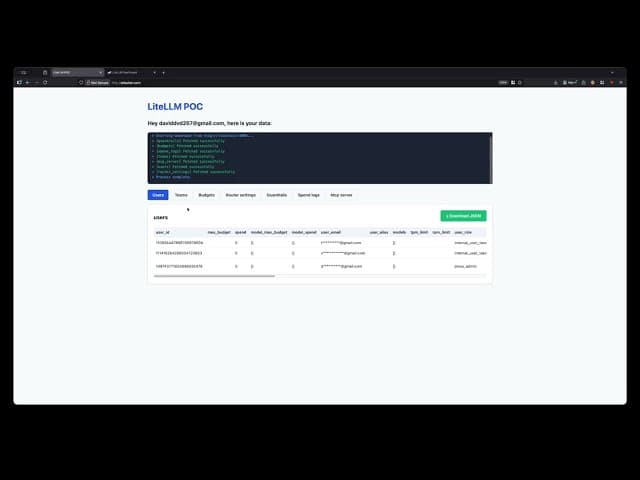
As the request that starts this flow (/sso/key/generate) comes from the terminal, there is no way to tie it to the session that starts the flow. The state token is not enough to prevent a CSRF in this case. So, an attacker that tricks the user into making a request to /sso/key/generate?key=sk-ATTACKERPOC&... can then retrieve a valid JWT for that user by making requests to the polling endpoint. This can be achieved via phishing or via a drive-by attack. The video below showcases how an attacker could steal the data of a [redacted] user via a malicious website by opening a pop-up. Why a pop-up and not a hidden iframe? More details are in the next section.
To properly secure such a flow, multiple methods can be used.
For example, when starting the OAuth flow with the OAuth Authorization Server, prompt=consent should always be used. This ensures that the user must consent to logging in to their account.
However, this may not always work, as some attackers make users expect to give their consent for SSO login, and it also adds more UX friction. Another mitigation is to add a confirmation step before completing the authorization process. After the callback request is made, the user should be prompted with a warning about the action they are about to take and given the opportunity to confirm they want to proceed. Using a randomly generated code displayed in the terminal that the user must enter can also be used (as Google does in the aforementioned spec).
Ultimately, a secure state implementation should be used when starting the flow with the provider to mitigate any CSRF risk.
Defense-in-depth mitigations
It’s worth calling out a few defense-in-depth mitigations that can reduce the stealthiness of iframe-based drive-by login CSRF, but none of these replace correct OAuth state handling.
1. Block framing with CSP frame-ancestors (best default)
If you don’t explicitly need your auth endpoints to be embedded, deny framing at the browser level. The modern way to do that is CSP’s frame-ancestors, which tells the browser which parent origins are allowed to embed this page (via <iframe>, <frame>, <object>, etc.). If the top-level attacker site isn’t allowed, the browser simply refuses to render your page in that frame.
Content-Security-Policy: frame-ancestors 'none';
Content-Security-Policy: frame-ancestors 'self'
https://trusted.example;
Examples of frame-ancestors usage
This is commonly discussed as clickjacking protection, but it also matters for CSRF-style exploit chains, since many drive-by attempts rely on silently running sensitive endpoints within hidden iframes.
If you still need legacy coverage, X-Frame-Options exists, but modern guidance is to prefer frame-ancestors because it’s more expressive and is the recommended control.
2. Cookie behavior in iframes is changing
Historically, if victim.com was embedded as an iframe inside attacker.com, requests from that iframe to victim.com would include victim.com cookies (subject to cookie attributes like SameSite). That “ambient credential in a third-party context” behavior is exactly what makes some iframe-based login CSRF attempts quiet and scalable.
Modern browsers are tightening this in different ways:
The SameSite attribute helps, but it’s not a complete CSRF defense (especially for top-level navigations), and it shouldn’t be treated as a substitute for true CSRF protections.
Firefox specifically has Total Cookie Protection (part of Enhanced Tracking Protection). In Standard mode, it partitions cookies by default in a way that often prevents third-party contexts (like iframes on unrelated top-level sites) from reading/setting the same cookie jar you would get in a first-party context.
3. CHIPS is a useful opt-in partitioning
CHIPS (“Cookies Having Independent Partitioned State”) is a browser mechanism for partitioning third-party cookie state, so embedded services can keep per-site session/config data without that cookie being reusable across unrelated top-level sites (the browser keeps a separate cookie jar per top-level site). In practice, this is expressed via the Partitioned cookie attribute (and partitioned cookies are typically set with SameSite=None; Secure so they can be sent in third-party contexts). A site must deliberately set a cookie with the Partitioned attribute for it to be placed in partitioned storage.
How it works, on a high level:
A
Partitionedcookie is stored in a separate cookie jar per top-level site (double-keyed by the cookie-setting origin and the current top-level site).That means the same embedded third-party (
victim.com) can keep state insideattacker.com, but that state is not reusable inside unrelated top-level sites. This helps preserve legitimate embedded use cases while limiting cross-site tracking and some cross-site credential reuse patterns.
CHIPS also comes with concrete requirements you need to get right:
Partitioned cookies must be set with
Secure.User agents only accept
Partitionedcookies in a third-party context ifSameSite=Noneis used.
A representative header looks like:
Set-Cookie: __Host-example=34d8g; SameSite=None; Secure; Path=/; Partitioned;
CHIPS can reduce some iframe-based “drive-by” behavior when your application intentionally embeds auth-related flows and needs cross-site cookie semantics. But CHIPS does not remove the need to implement OAuth state correctly.
Even with these mitigations, pop-ups still carry risk; partitioning and anti-framing controls raise the bar for stealthy hidden iframes, but attackers can still use pop-ups or top-level navigations, where cookies are much more likely to be sent in the “normal” way. So treat these as nice-to-have guardrails, not the core fix.
In other words, browser privacy and security hardening features help, but the OAuth correctness requirements in this article remain non-negotiable.
Conclusion
OAuth 2.0 is conceptually simple: delegate access without sharing passwords. However, real-world deployments often have flaws that can lead to impactful vulnerabilities. The OAuth 2.0 spec is explicit that CSRF protection relies on an unguessable state value that is matched to the user-agent’s authenticated state (i.e., the session that started the flow).
So, treat the state as a security control with three non-negotiable properties:
Present (not accidentally disabled by config or library quirks).
Unpredictable (true per-request entropy, not a deterministic template).
Session-bound (validated against the same browser session that initiated the authorization request).
For custom / cross-device flows, you cannot rely on classic binding, so you need an explicit human confirmation step. In practice, that means adding friction in the right place: always force a fresh consent/interaction at the provider when possible, and/or require a code displayed in the terminal/device that must be entered in the browser before the server releases tokens.
Browser privacy changes like CHIPS help, but don’t save vulnerable implementations. Partitioned cookies reduce what hidden iframes can do cross-site by default, which raises the bar for stealthy drive-by login CSRF, but pop-ups and top-level navigations can still carry authenticated cookies, and CHIPS is opt-in, so the underlying OAuth correctness requirements remain.
Whether you are a developer trying to build a secure app or a security expert auditing one, make sure to always inspect OAuth flows carefully, and make sure they follow the best practice specs, as a mistake in such critical components can result in high-impact vulnerabilities.
Project | Fix | Impacted versions |
Langfuse (CVE-2025-65107 ) | Langfuse fixed the security issue by implementing a conditional pattern that defaults to an empty object when | >=2.95.0, <2.95.12; >= 3.17.0, <3.131.0 |
Authlib (CVE-2025-68158) | Authlib addressed the vulnerability by mandating that state data be stored in the user's session, even when an external cache is utilized, thereby strictly binding the OAuth state to the initiating session to prevent CSRF attacks. | <v1.6.6 |
Fast-Api SSO (CVE-2025-14546) | To prevent CSRF attacks, | <0.19.0 |
Fastapi-users (CVE-2025-68481) | To address the vulnerability, | <15.0.2 |