
Rendering links
Rendering links is common in most modern applications. Whether we’re talking about blogs, forums, documentation apps, AI chat platforms, or social media apps, links are used to reference external content and connect different parts of a page.
To reduce complexity for users and avoid writing raw HTML, many applications use markup languages like Markdown. Markdown allows you to define links, styled text, and other elements that are later converted into HTML. Similarly, math renderers take user input and transform it into equations using LaTeX syntax, and they can also contain links.
As we already know, anchor (a) tag links can contain JavaScript code that the browser executes when clicked, creating a potential XSS risk. This makes URL validation critical for any renderer that generates links.
Content renderers validate links at render time, but the browser doesn’t execute URLs exactly as it receives them. The URLs are normalized and later reinterpreted according to the browser’s parsing rules. This difference between what the renderer validates and what the browser executes allows security filters to be bypassed. To understand why this happens, we first need to look at how browsers parse URLs.
How browsers parse href URLs
Browsers don't process URL links in a single step. They normalize encoded characters, ignore whitespace, and accept some Unicode characters in three different steps. Let’s break down each of the three steps:
1. HTML parsing
In this first step, the HTML parser tokenizes the document and resolves character entities as it builds the DOM. There are three types of allowed entities that the browser will decode: named, decimal numeric, and hex:
Type | Syntax | Example |
Named entities | &name; | < → <, > → >, & → &, " → ", ' → ', → |
Decimal entities | &#DDD; | < → <, a → a, j → j |
Hex entities | &#xHH; | < → <, a → a, j → j |
By the time the DOM is built, the browser has already decoded the character entities. For example, we can encode the javascript pseudo-protocol using character entities:
The browser will decode the entities as follows in the resulting DOM:
The href attribute now contains executable JavaScript code, even though the original string had no visible javascript: string.
2. URL parsing
When the link is clicked, the browser runs the URL parser and attempts to determine how to navigate the URL. This occurs after the page has loaded and the DOM has been built.
At this step, we have multiple string normalizations:
Percent‑encoded bytes are decoded
The scheme is detected case‑insensitively
Tabs, newlines, and carriage returns are stripped from the scheme
Leading and trailing whitespaces are ignored
Type | Syntax | Example |
Percent decoding | %HH | %61 → a, %6A -> j, %20 → ‘ ‘ |
Whitespace characters | %09, %0A, %0D | java%09script: → javascript: |
Case-insensitive scheme | a-z = A-Z | JaVaScRiPt: → javascript: |
All of these encoded protocols normalize to javascript:alert(1) when the browser processes the URL:
A renderer checking for the exact javascript: string at render time will miss all of the normalizations, because the transformations happen later, in the browser, when the user clicks.
3. JavaScript parsing
For any scheme other than javascript, the browser treats the URL strictly as a navigation target. If the resolved scheme is javascript, the content following the protocol is passed to the JavaScript engine. The JavaScript parser decodes the escape sequences during its lexical analysis before execution:
Type | Syntax | Example |
Unicode escape | \uHHHH | \u0061 → a, \u003C → < |
Hex escape | \xHH | < → <, a → a, j → j |
Special character escape | \n, \r, \t | newline, carriage return, tab |
For example, the Unicode escape characters will be decoded by the JavaScript engine:
By chaining encodings across all three parsing stages, we can create an obfuscated payload that bypasses validation at every layer:
For the above string, the browser will perform the following decoding chain:
HTML parsing:
j→j→javascript:%5c%75%30%30%36%31lert(1)URL parsing:
%5c%75%30%30%36%31→\u0061→javascript:\u0061lert(1)JavaScript parsing: \u0061 → a → alert(1)
This multi-step decoding makes URL validation tricky. To properly validate the URL in the href attribute, we need to follow the same steps the browser does before performing protocol validation. With that in mind, let's look at how Markdown renderers handle link validation.
Markdown renderers
Many Markdown renderers include some form of HTML sanitization, but the behavior varies. Some disable raw HTML by default, others allow it entirely, and many leave sanitization to the application itself.
However, some renderers include built-in sanitization, and Goldmark is one example.
Goldmark
GoldMark is a popular markdown renderer in Go. By default, Goldmark attempts to sanitize raw HTML or potentially dangerous URLs.
To render link elements, we can use the standard Markdown syntax:
Internally, the renderLink function handles the conversion to HTML. Before writing the URL content to the href attribute, it checks if the protocol is dangerous using the IsDangerousURL function:
The function treats data: URLs as a special case. Since data URLs can embed arbitrary content, they’re generally dangerous. However, image data URLs are allowed, so data:image is allowed as long as the image type is one of the defined formats (PNG, GIF, JPEG, WebP, or SVG).
For all other URLs, the check is much simpler. If the URL starts with a blocked protocol javascript:, vbscript:, file:, or data:, it’s considered dangerous.
The function compares the beginning of the URL against known dangerous protocols, using the hasPrefix function. The comparison is case-insensitive, so JavaScript: and JAVASCRIPT: are both detected:
The issue is that the function assumes the protocol appears in plain text at the beginning of the URL. However, HTML5 named character references let us encode the colon as ::
The URL doesn't start with the javascript: pseudo-protocol, so IsDangerousURL allows it through. After IsDangerousURL allows the URL and is marked as safe, Goldmark applies the URLEscape function:
The URLEscape function calls ResolveEntityNames, which resolves the HTML5 character entities:
The ResolveEntityNames function will then make the rendering apply entity resolution for the HTML5 characters:
Finally, the LookUpHTML5EntityByName function resolves the : entity to the literal “:” character:
The final javascript:alert() payload becomes javascript:alert() in the final HTML output, and the JavaScript injection is possible.
Goldmark validates the URL in its encoded form and then normalizes it. The safety check sees javascript:, which doesn't match the dangerous prefix. But after entity resolution, the browser will parse javascript:, which executes. The parsing order mattered here: validation ran before normalization, so the encoded payload slipped through.
Goldmark was fixed in version 1.17.6 (CVE-2026-5160) by running the IsDangerousURL check on the normalized URL, after entity resolution is applied by the util.URLEscape function:
Let’s look at a real-world example of a software using Goldmark.
Hugo
Hugo uses Goldmark as its default Markdown renderer, inheriting its Markdown features. While Goldmark focuses on parsing Markdown into a structured AST, Hugo adds another layer on top: render hooks.
Render hooks turn parsed links and images into final HTML. In Hugo’s Goldmark integration, link rendering is handled in render_hooks.go, where the destination URL is passed through Hugo’s rendering pipeline before being rendered as an href attribute:
hugo/markup/goldmark/render_hooks.go
This resulted in Hugo rendering the following Markdown, which will render the link that contains the JavaScript payload:
Hugo is often used to build websites from Markdown coming from multiple sources. When Markdown content is not trusted, and we render user-generated content or documentation from external repositories, this can be problematic because users can run JavaScript code.
We've seen how a Markdown renderer can be bypassed through named entities. Math renderers, for example, also support link syntax. And since they're often processed separately from Markdown, they come with their own validation logic.
Math rendering
In addition to Markdown rendering, many software also support math rendering, which uses LaTeX syntax to display equations. The math renderers can also include links inside equations to reference other external documents.
How math is rendered
Most of the software relies on two major libraries: MathJax and KaTeX. Both libraries render raw LaTeX input to HTML.
In many implementations, math rendering is handled separately from Markdown parsing, with the processing stage varying between server-side and client-side setups. Once the HTML is inserted into the DOM, the library scans the page for math delimiters such as $...$ or $$...$$. When it finds matching text nodes, it replaces them with the rendered equation output.
For example, KaTeX parses the DOM starting from the content field element and looks for the math delimiters before transforming the matched text into HTML:
Since equations can contain links, both MathJax and KaTeX sanitize equation content before rendering.
KaTeX link rendering
KaTeX lets you insert links inside equations using macros like \href, which is useful when you want a formula to point to a reference or another part of a document.
KaTeX provides a trust option that developers can use to allow clickable links in math content. You can set it to true to allow everything, or provide a trust function. This function receives a context object with details about what’s being rendered.
For URL commands, KaTeX defines the trust context like this:
Both \href and \url include the protocol field. This field is populated automatically by KaTeX before the trust function is called, providing the URL scheme (http, https, javascript, etc.) already extracted and ready to check.
When a user writes \href{javascript:alert(1)}{Click me}, the command handler in href.js builds a context and asks if it should be trusted:
The isTrusted() function then takes that context, extracts the protocol from the URL, and adds it to the context before calling our trust function:
By the time the trust function is called, the context object contains the command, the full URL, and the extracted protocol:
The trust mechanism works like an allowlist, where everything is permitted by default. If your function returns true, the command renders.
Here’s an example of a KaTeX trust configuration:
This checks the command but ignores the protocol. The function receives the protocol javascript in the context, but because it only checks the command name, it returns true.
Once the trust option is enabled, KaTeX no longer blocks URLs. If the protocol isn’t checked, all schemes are allowed. The protocol field is provided to let developers filter dangerous URLs, but KaTeX does not enforce this automatically.
As a result, this can be exploited directly from a math expression. If a KaTeX renderer enables trust without validating the protocol, we can inject a \href element that uses the javascript: protocol:
Discourse rendering math
Discourse is an open source discussion platform widely used for technical forums and support communities. It supports Markdown, plugins, and math expressions through KaTeX.
In Discourse, the KaTeX configuration followed the same approach, checking the command name but ignoring the protocol:
plugins/discourse-math/assets/javascripts/initializers/discourse-math-katex.js
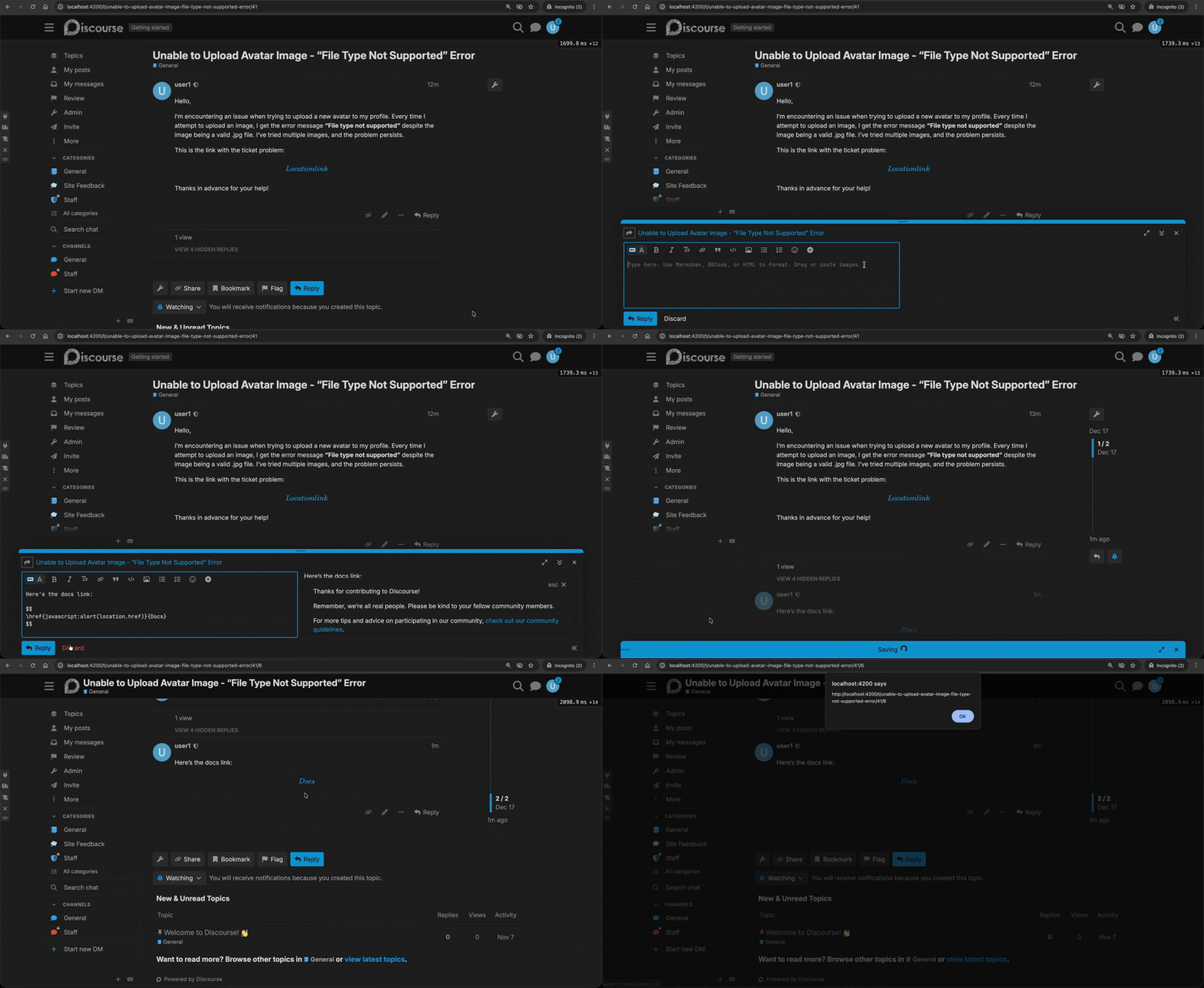
The trust function allowed \htmlId and \href commands, but never checked context.protocol. This meant that any user could embed JavaScript code within an \href equation using the javascript: protocol.
This allowed any logged-in user to post a reply or to create a new forum post and insert a malicious equation containing JavaScript code:
MathJax link rendering
MathJax lets you insert links inside equations following the same LaTeX conventions: \href{URL}{content} wraps the math content in a link.
To sanitize math content and prevent JavaScript execution, MathJax includes the ui/safe extension. To enable the ui/safe extension, we can add it to MathJax’s loader config:
This extension is designed to block the dangerous URL protocols. However, all versions prior to v4 are vulnerable to a line-break-based bypass. The filterURL function extracts the protocol using a regex that only matches ASCII letters:
ts/ui/safe/SafeMethods.ts:42-51
The regex [a-z]+ stops matching when it encounters a line break character. If the protocol contains a newline before the colon, the match fails, and the protocol becomes an empty string. The “!protocol” condition then evaluates to true, and the URL is allowed through.
As we have seen before, the browser ignores the line break and will interpret the full protocol normally. This allows attackers to bypass the safe extension and inject executable JavaScript:
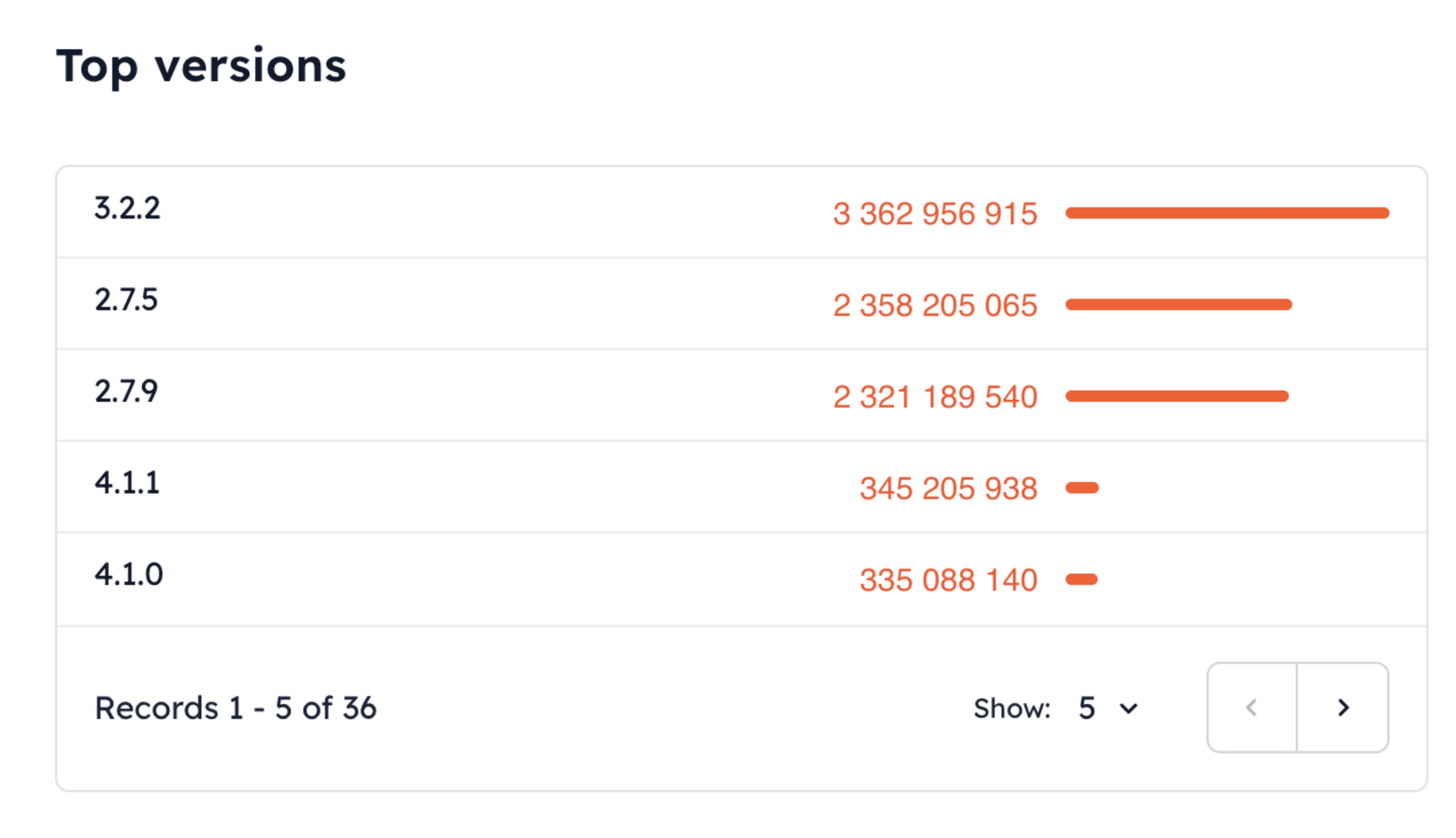
The vulnerability was fixed in v4.0, but the patch was never backported to v3.x. Sites using MathJax v3.2.2 (the latest v3 release) with the safe extension enabled remain vulnerable.
According to jsDelivr CDN statistics, MathJax v2 and v3 are still by far the most used versions. While v4 introduced security fixes, including the URL sanitization bypass, adoption remains low compared to the legacy versions:
Takeaways and mitigations
Markdown parsers, math renderers, and browsers don’t see URLs in the same form, and they don’t process them at the same time. A link may appear harmless when a renderer first inspects it, but by the time the browser finishes decoding and normalizing it, the exact string can become executable code.
This is the case with Goldmark, KaTeX, and MathJax. Each component applies its own parsing rules and validation logic, assuming it operates on the final URL, and tries to block the protocol. In practice, the browser still has additional decoding steps to apply.
When rendering user-controlled content that may contain links, enforce a strict protocol allowlist for URLs referenced from JavaScript-accessible content (for example, allowing only http and https).
If you still need to be thorough, ensure that the URL handling validates links after they have been fully normalized, not while they are still encoded. You must first normalize the input by resolving character entities, decoding percent-encoded sequences, removing control characters, and normalizing whitespace to achieve a canonical form.
Only after normalization should validation occur: extract the URL scheme and enforce a strict protocol allowlist (such as http, https, and mailto). Any scheme outside this allowlist must cause validation to fail before rendering.
Markdown and math renderers focus on converting syntax to HTML. Even when they include sanitization, it may not cover all edge cases. Always pass rendered output through a dedicated sanitizer, such as DOMPurify, before inserting it into the DOM.
Also, a strict Content Security Policy (CSP) can block inline JavaScript execution even if a javascript: protocol slips through. You can use script-src directives that disallow unsafe-inline.